The IDE that runs
your experiments.
Operon pairs Claude with your lab's HPC, 180+ analysis protocols, an MCP research catalog, and a private-LLM stack — so the only thing you write is the question.


Feel the agent
without installing.
Three live demos — a mode picker, a scripted Claude conversation, and a side-by-side of the old way vs. Operon. No account, no install.
Which AI mode should I use?
Answer three questions and we'll point you at the right mode.
Mode picker
What stage is your work at?
Should Claude touch your files?
Do you need citations or polished output?
Agent mode
Claude will run commands in your shell, edit files, and iterate on outputs until the analysis finishes. You watch the stream and step in when needed.
Plan mode
Claude writes an implementation_plan.md — a step-by-step proposal you can review, edit, and approve before any code runs. Great for risky or long-running work.
Ask mode
Read-only conversation. Toggle PubMed and Claude cites real DOIs. Perfect for the "why did DESeq2 shrink these log-fold changes?" moments.
Report mode
Turn a finished session into a publication-ready PDF — methods, figures, citations, and a reproducibility appendix, all generated from the session transcript.
A real Operon conversation, replayed.
Pick a scenario and watch Claude stream tool calls, thinking, and cited answers.
The old way vs. with Operon.
Same analysis, two worlds. Drag the divider.
bulk-rnaseq — manual
You open a blank terminal and write:
# Write a Snakefile from scratch
$ vim Snakefile
# Set up the conda env
$ conda create -n rnaseq -c bioconda fastp star subread deseq2
$ conda activate rnaseq
# Write the alignment rule...
rule align:
    input:  "fastq/{sample}_R1.fq.gz"
    output: "bam/{sample}.bam"
    shell:  "STAR --runThreadN 8 --genomeDir {genome} ..."
# 40 more rules, plus SLURM profile, plus QC...
$ snakemake -j 16 --use-conda --profile slurm
# STAR segfaults at 4 a.m. No traceback.
$ tail log.out
Segmentation fault (core dumped)
# Read the STAR source on GitHub for two hours.
# Realize --genomeLoad is the problem.
# Fix it. Rerun. Repeat.
Time: 2–3 days · Expertise: advanced
bulk-rnaseq — conversational
You open Operon and type:
You: Run a standard bulk RNA-seq pipeline on the FASTQs in ./raw —
     I want counts, a DESeq2 contrast of WT vs. KO, and volcano plots.

Claude ✻ Plan:
  1. Detect 6 samples · paired-end · ~30M reads each
  2. Apply protocol: bulk-rnaseq.v3 (fastp → STAR → featureCounts → DESeq2)
  3. Submit as SLURM array on HPC
  4. Generate volcano + heatmap

[Proceed?] y

⠋ Running fastp on 6 samples...        ✓ done (4m12s)
⠋ STAR alignment (SLURM job 284712)...  ✓ done (38m)
⠋ featureCounts → counts.tsv...         ✓ done
⠋ DESeq2 contrast WT vs. KO...          ✓ 412 DEGs (FDR < 0.05)
⠋ Rendering volcano + heatmap...        ✓ figs/ready

Session summary written to report.md.
Time: 45 minutes · Expertise: whatever you already have
Describe the analysis.
Operon runs it.
Point Operon at your data and ask for the experiment. Claude writes the script, runs it in your terminal, reads the output, and iterates until the plot is on disk. You watch.
- Understands FASTA, FASTQ, VCF, BAM, GFF, H5AD, MTX, and 20+ other formats
- Runs commands in your shell — respects conda, modules, aliases
- Streams every tool call so you can interrupt, redirect, or approve
Your lab's pipelines,
one click away.
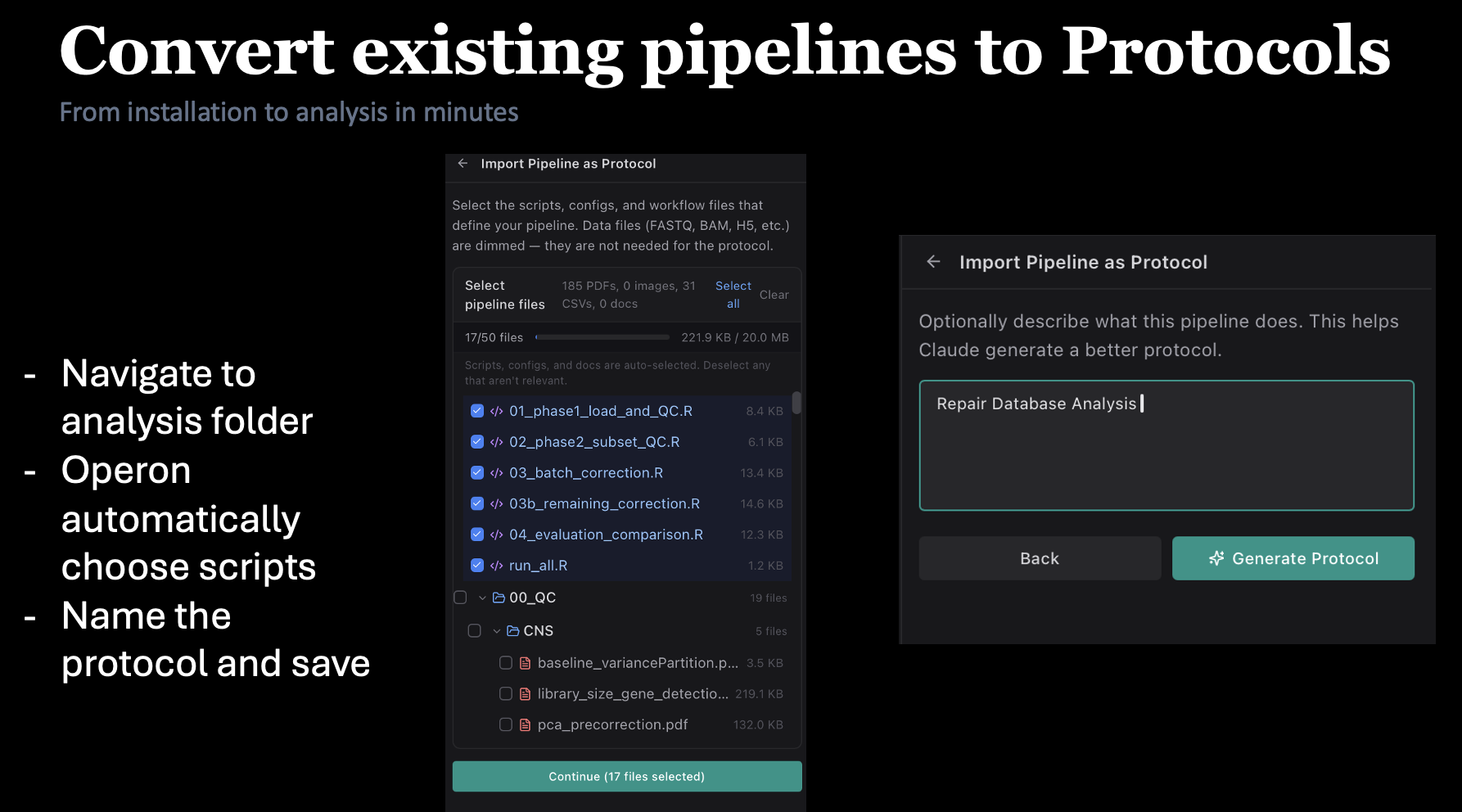
Drop a Snakemake workflow, Nextflow pipeline, bash script, or R notebook into Operon and Claude turns it into a reusable protocol — parameters, dependencies, and run command all captured. Share it with your lab, run it from any project, version it with Git.
- Import Snakemake, Nextflow, bash, or R workflows in one drag
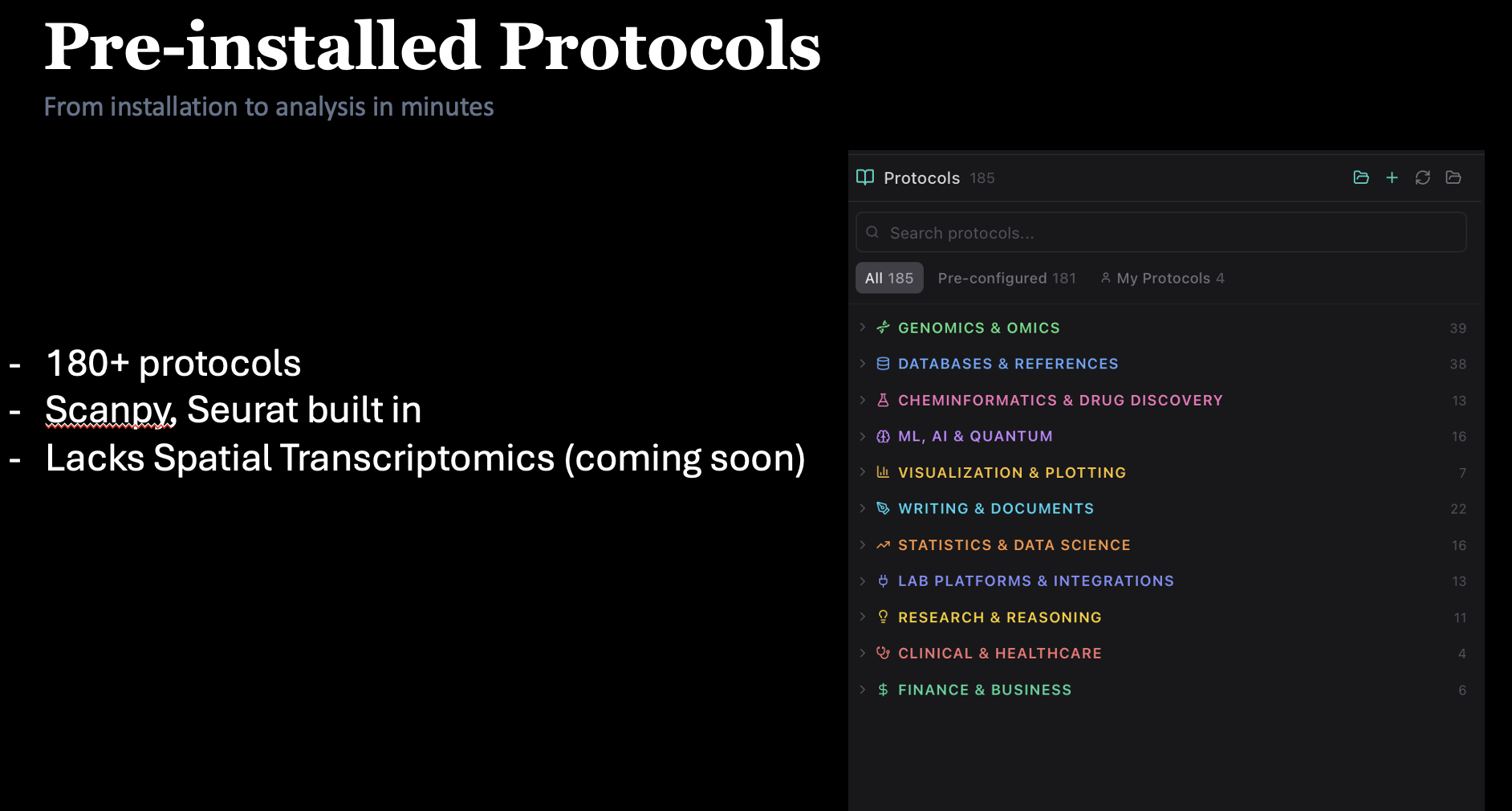
- Browse a growing catalog of bioinformatics protocols — scRNA-seq, ATAC, ChIP, bulk, spatial
- Run any protocol on local data or over SSH on your HPC
Grounded in the literature.
Ask mode is pure Q&A — no commands, no file writes. Toggle PubMed and Claude will search NCBI, retrieve papers, and answer with proper citations. No API key required.
- Ideal for "why did DESeq2 shrink these log-fold changes?" moments
- Cites real DOIs you can open in one click
- Works alongside the editor — perfect for literature review sessions
Run on your cluster,
not your laptop.
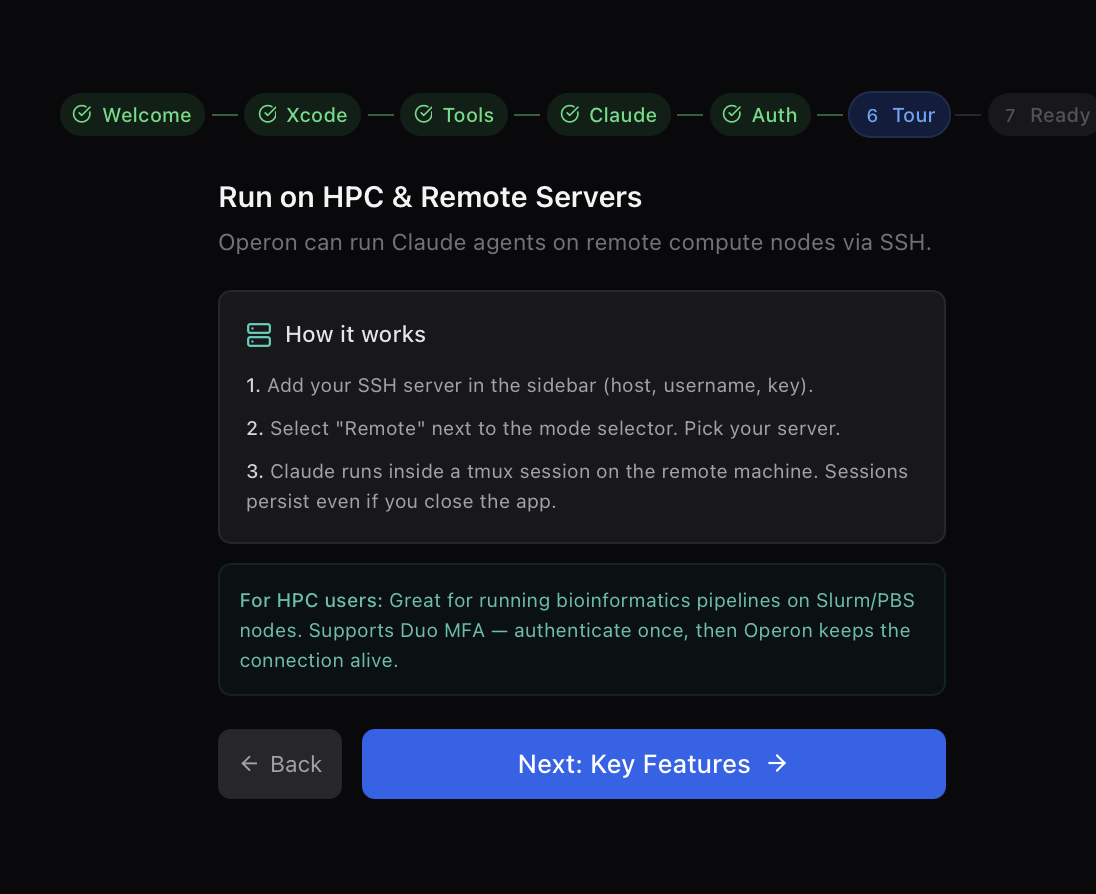
SSH into your institution's HPC, grab a compute node, and let Claude run inside a persistent tmux session. Sessions survive dropped Wi-Fi and closed laptops. Your data never leaves the server.
- SLURM, PBS/Torque, and SGE batch-job templates built in
- Shared-filesystem aware — works around
/tmpbeing node-local - Resume a running analysis from any Mac, Windows, or Linux machine
Your data. Your model.
Your machine.
Clinical cohorts, embargoed sequencing data, industry collaborations — some of your work simply cannot leave your network. Operon was built for that reality from day one.
Run locally with Ollama
Point Operon at a local Ollama daemon and run llama3, qwen-coder, deepseek-coder — any model you've pulled. Zero network egress.
On-prem via vLLM or LM Studio
Spin up vLLM or LM Studio on a lab server. Operon's bundled translation proxy turns any OpenAI-compatible endpoint into a first-class backend.
40+ backends, one interface
LiteLLM, OpenRouter, Together, Groq, DeepInfra, Cerebras — all work through the same translation proxy. Switch providers per-session, not per-install.
Secrets in the OS keychain
API keys live in macOS Keychain, Windows Credential Manager, or libsecret on Linux — never in plain-text config files, never in telemetry.
Reverse-tunnel to your cluster
Host a 70B model on an A100 node, tunnel it over SSH, and query it from your laptop like it's localhost. The recipe is documented, not magic.
No telemetry
Operon collects nothing. Not a session count, not a crash breadcrumb, not a ping. If you want to see for yourself — the source is on GitHub.
Fully air-gapped
No license server, no update pings, no phone-home. Unplug the Ethernet cable and Operon still starts, still runs Ollama, still executes protocols.
Per-model token budgets
Set hard ceilings on tokens-per-session and dollars-per-month. Operon stops and asks before crossing — no surprise invoices from cloud backends.
The tools biologists actually use — one click away.
Operon ships with a catalog of 12+ MCP servers that give Claude direct, typed access to the databases your analysis depends on. Install, toggle, and every chat session gets the tool.
PubMed
Full-text literature search grounded in NCBI's E-utilities.
BioMCP
PDB structure retrieval, UniProt lookups, AlphaFold access.
GEO
Query any GSE accession, pull metadata, stream count matrices.
GTEx
Tissue-specific expression across the GTEx v8 release.
JASPAR
Transcription-factor motifs for enrichment workflows.
KEGG
Pathway-level enrichment and gene-ontology crosswalks.
AlphaFold
Predicted structures by UniProt ID, straight into PyMOL.
Gene databases
Cross-species ortholog lookup, Ensembl and RefSeq resolution.
Everything you'd leave an IDE to do — already here.
Four AI modes
Agent · Plan · Ask · Report.
180+ protocols
RNA-seq, scRNA, ATAC, spatial, proteomics, more.
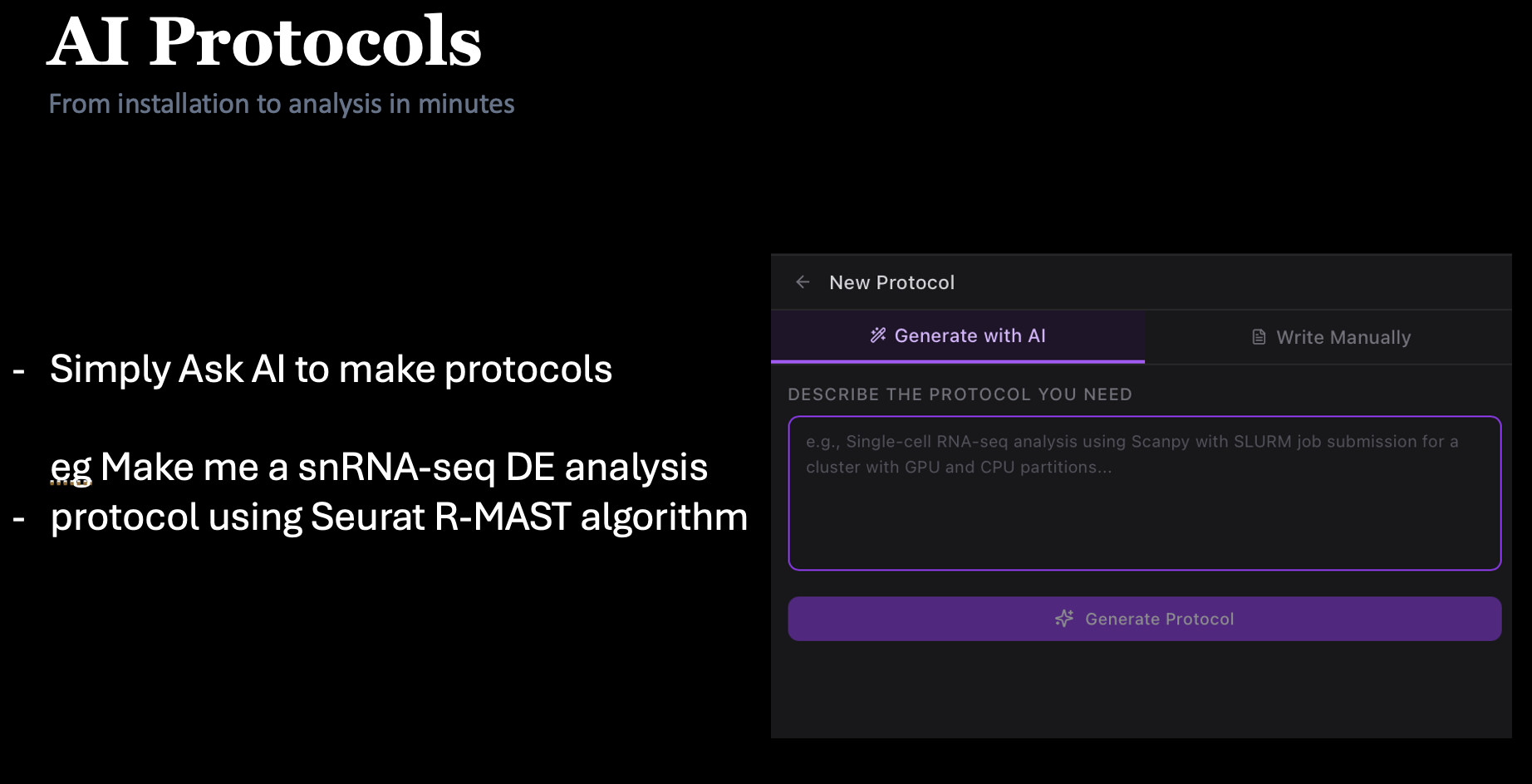
Protocol generator
Describe a workflow; Claude writes the full protocol.
PubMed-grounded
Real citations, real DOIs, no hallucinations.
SSH + tmux + SLURM
Persistent sessions on remote compute nodes.
Claude on compute nodes
The agent runs where the data lives.
MCP catalog
PubMed, GEO, GTEx, JASPAR, KEGG, AlphaFold.
Private LLMs
Ollama, vLLM, LM Studio — local or on-prem.
Monaco editor
The engine that powers VS Code — 30+ languages.
Git + GitHub
Stage, commit, push, publish — all in-app.
Voice dictation
Native OS speech recognition into the chat input.
Report mode
Turn a session into a publication-ready PDF.
180+ analyses, curated.
Every protocol encodes real-world best practices — conda environments, tool versions, QC gates, SLURM resource hints — so Claude doesn't guess. Pick one to start, or describe your own.
Scanpy end-to-end
QC, normalization, HVG, PCA, Leiden clustering, UMAP.
Seurat integration
Multi-dataset harmonization with SCTransform.
DESeq2 · PyDESeq2
Count modelling, shrinkage, volcano + MA plots.
CellPose segmentation
Model selection, GPU config, mask QC.
Visium / 10x spatial
Spot deconvolution and niche analysis.
ATAC-seq pipeline
Alignment, peak calling, motif enrichment.
AlphaFold lookups
Fetch, align, and render predicted structures.
scVelo trajectories
RNA velocity on raw or processed counts.
Watch a biologist use it.
Every feature in this page has a 5-minute video walkthrough. Start with the full install; skip to the scRNA-seq or CellPose demo if you want to see the agent in action.
Made at the bench,
for the bench.
Operon is developed by the Swarup Lab at UC Irvine — a neurogenomics group running single-cell, spatial, and epigenomic experiments in Alzheimer's disease. We built Operon because we needed it ourselves.
 Swarup LabUC Irvine · Dept. of Anatomy & Neurobiology
Scroll through a real session.
One scroll, one analysis — from opening the app to publication-ready figures on disk.
Open the workspace.
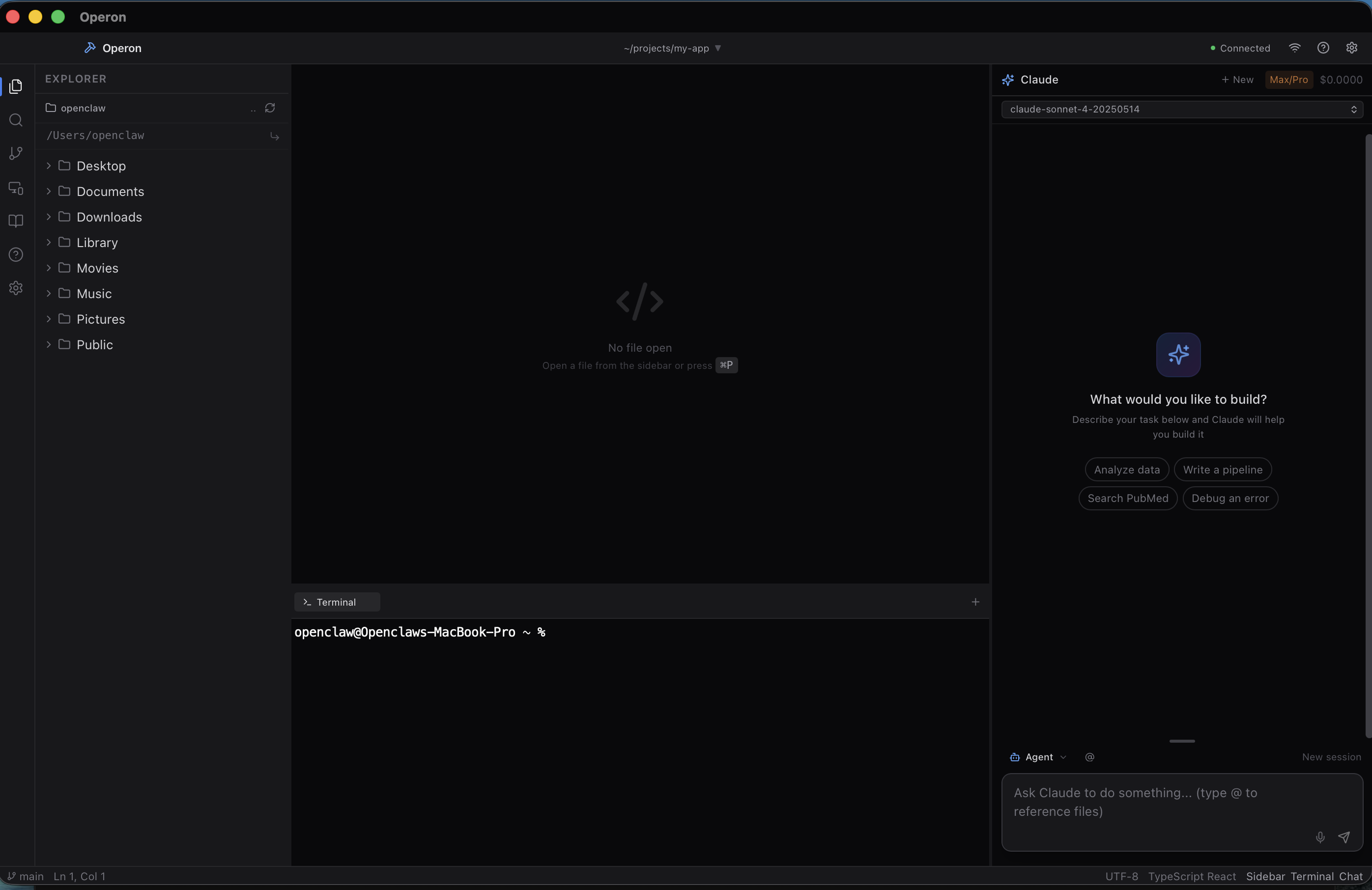
Project folder on the left, Monaco in the middle, terminal at the bottom, Claude on the right. Everything in one window — no tab-hopping.
Pick your AI mode.
Agent runs commands. Plan drafts a proposal. Ask is pure Q&A with PubMed. Report wraps the session into a PDF. One keystroke to switch.
Start from a protocol.
Drop in your data and pick a protocol — scRNA-seq, ATAC, CellPose, any of 180+. Or describe what you want and Claude writes a fresh one.
Ground every claim.
Toggle PubMed and Claude pulls real DOIs to back its answer. No hallucinated citations, no API key, no separate tab.
Ship it on the HPC.
SSH to the cluster, grab a compute node, hand the analysis to Claude in a tmux session. Close the laptop. Come back tomorrow to finished figures.
Get Operon.
Free. Open-source. macOS, Windows, and Linux. No account required to install.
v0.6.1 · release notes · all downloads & checksums